The full catalogue of ZAP~POST templates are regularly updated here.
InDesign & PDF Templates
Download links for paper stock options (.zip files containing Adobe InDesign Files):
Zap IMPACT Postcard: 240mm x 155mm
InDesign
PDF
Zap SECURE Letter: 210 x 297mm
InDesign
PDF
Zap A5 One Piece Mailer (OPM): 210mm x 336mm
InDesign
PDF
Zap A5 Postcard: 210mm x 148mm
InDesign
PDF
Zap A6 Postcard: 148mm x 105mm
InDesign
PDF
ZAP Handwritten Note (Postcard in Envelope)
210mm x 148mm & mailed in a plain, white envelope with handwritten-style address and green stamp, no postage indicia.
InDesign
PDF
Read all about this new option!
Zap Postcard in Envelope (PiE)
210mm x 148mm & mailed in a plain, white envelope with address printed on.
InDesign
PDF
Zap A6 Occasion Card
210mm x 148mm flat, 105 mm × 148 mm folded & mailed in a plain, white envelope with address printed on.
InDesign
PDF
Zap US Occasion Card
6.75in x 10in flat, 4.99in × 6.75in folded & mailed in a plain, white envelope with address printed on.
InDesign
PDF
ZAP US Impact Postcard (6" x 8.5")
InDesign
PDF
ZAP US Standard Postcard (4.25" x 6")
InDesign
PDF
ZAP US Secure Letter
InDesign
PDF
For all templates, you can create the content in Adobe InDesign (or any other software package) and export the final JPGs into the Zap App. Or you can design from scratch inside the App.
Adobe InDesign instructions
Important things to remember:
Add any variable text, or dynamic content like variable images or QR codes directly in the ZAP App, as opposed to saved into the images you export out of InDesign.
Best practices:
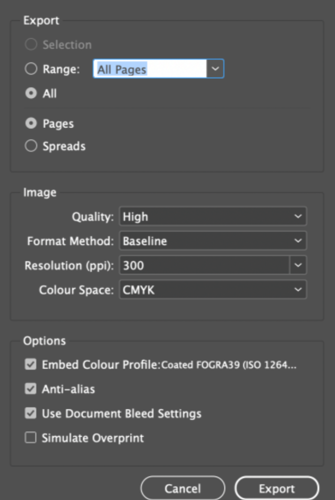
- 300dpi/ppi print resolution
- Images in CMYK colour space (not RGB) as .jpgs with no compression
- Ensure images extend to the red bleed line to allow for trimming
- Export WITHOUT trim/crop marks ticked
- Keep important text or detail inside the safe zone, denoted by the red dashed line
- When exporting jpg images from our templates, use settings as shown:
- (Note - Use Document Bleed Settings is ticked on)
Jump to it In this article:
Recommended Reads